10 Best Photo Sharing Apps 2026: Free, Private & Group
The 10 best photo sharing apps of 2026 compared by quality kept, account friction and where each free tier ends. Every limit re-verified 10 Sept 2026.

Every photo sharing app makes the same promise: your pictures, everyone who matters, one place. The differences hide in three details almost nobody checks before choosing — how much quality survives the upload, who has to create an account, and where the free tier quietly ends.
We checked all three for nine of the best-known photo sharing apps of 2026 — plus our own, EventPixel — against each platform's current documentation, not old reviews. Every limit and price below was first verified in August 2026 and re-checked against each platform's own live pages on 10 September 2026; the How we checked section at the end says what moved.
Short on time? The table has the whole story. The rest of the article explains when each app is the right choice — including where our own platform, EventPixel, does and doesn't belong in the conversation.
Every Photo Sharing App Compared (2026)
| App | Best for | Free tier reality | Account needed to add photos? | Quality kept |
|---|---|---|---|---|
| Google Photos | All-round backup + casual sharing | 15 GB shared with Gmail & Drive | Yes (Google account) | Original, or 16 MP in Storage saver |
| iCloud Shared Albums | Apple-only families | Older albums: 5,000 photos, no quota cost. New iOS 27 albums use the owner's storage | Yes (Apple account, invited) | Full resolution in albums created or upgraded on iOS 27; older albums 2048px, video 720p |
| Amazon Photos | Prime members | Unlimited full-res photos with Prime; 5 GB videos | Yes (Amazon account) | Original |
| FamilyAlbum | Kids' photos for relatives | Unlimited photos; videos capped at 2 min | Yes (app, invited) | Not published |
| Cluster | Small private groups | 10 groups × 1,000 photos | Yes (invited members) | Not published |
| PhotoCircle | Free group albums (with a catch) | Unlimited count, but compressed | Yes (app + account) | 3.2 MP; 12 MP only on organisational plans |
| Dropbox File Requests | Collecting originals from anyone | 2 GB total storage | No | Original |
| Flickr | Photographers & portfolios | 1,000 items total, then Pro at $11/mo or $82/yr | Yes (Flickr account) | 200 MB/photo; full-res is Pro's headline |
| The default everyone already has | Free, groups up to 1,024 | Yes (WhatsApp + your number) | Compressed; HD mode helps | |
| EventPixel | Weddings, parties & events | Free: 100 uploads, event site, live photo wall | No — guests scan a QR | Original in and out |
One pattern worth noticing before the detailed reviews: only two options in the entire list let someone add photos without creating an account — Dropbox File Requests and EventPixel. For everything else, every contributor signs up or signs in. That single detail decides most group-sharing outcomes. If your circle is a family rather than a crowd, our guide to the best family photo sharing apps ranks the same tools by what grandparents can use without an app.
Best Photo Sharing Apps for Personal Backup and Family

1. Google Photos — the all-rounder
Still the strongest general-purpose option. Shared albums hold up to 20,000 items, links can be shared as a QR code, and search is unmatched.
The fine print: your 15 GB of free storage is shared with Gmail and Drive, and while anyone with a link can view an album without an account, contributing photos is tied to a Google account identity. Face grouping also isn't available in every region or account type. Verdict: best default for personal libraries; weaker the moment contributors don't live in Google's world.
2. Apple iCloud Shared Albums — fine inside the walled garden
Effortless between iPhones, and Shared Albums changed with iOS 27. Albums created on iOS 27, iPadOS 27, macOS 27 or iCloud.com share photos and videos at full resolution, and anything new added to them counts against the album owner's iCloud storage, whoever adds it. Older albums keep the old rules until the owner upgrades them: photos reduced to 2048 pixels on the long edge, videos up to fifteen minutes at 720p, 5,000 photos and 100 subscribers, and no cost to anyone's quota. Upgrading only lifts the resolution for items added afterwards. Android guests are the other limit: contributing requires an Apple Account and an invitation, a path almost no Android guest will take. Verdict: great for all-iPhone families, now without the quality penalty on new albums; skip it if Android guests matter or the owner's iCloud plan is small.
3. Amazon Photos — the Prime perk people forget
If you already pay for Prime, you have unlimited full-resolution photo storage sitting unused (Amazon's help page now lists standalone Alexa+ subscribers alongside Prime members). Family Vault extends it to five more people, each getting unlimited photo storage without their own Prime membership. The catches: videos are never unlimited (5 GB unless you pay), and every contributor needs an Amazon account. Verdict: the best value in the list if you have Prime; irrelevant if you don't.
4. FamilyAlbum — grandparent-proof, for one job
Free unlimited photo storage — the company markets it as no fees, no storage limits — built for one scenario: parents sharing kids' photos with invited relatives (up to 100 per album). Videos cap at 2 minutes on the free plan, uploads happen through the app, and it isn't trying to be an event tool — which is exactly why it's good at what it does. The company announced 30 million users in May 2026, and Premium (from $2.99/month) lifts videos to 10 minutes. Verdict: best free choice for the new-baby group; nothing else it's for.
Best Private Photo Sharing Apps for Groups
Privacy here means invite-only by design, not a hidden link. If privacy is the main thing you are choosing on, our ranking of the best private photo sharing apps goes deeper on ads, audit trails and who can see what.
5. Cluster — the quiet indie favorite
A small independent team has run Cluster since 2013, and it shows in the product's restraint: private invite-only groups, no ads, nothing public, ever. Free covers 10 shared photo albums ("groups") of 1,000 photos each, and members can use the web instead of the app. The paid Cluster Club tiers are sold inside the app rather than on the website: Friend at $4.99/month or $49.99/year, Family at $9.99/month, Pro at $19.99/month. Verdict: the best shared photo album app for a private circle that distrusts big-platform lock-in.
6. PhotoCircle — read the fine print first
Actively maintained, popular (4.9 stars from 123,000 App Store ratings, 1M+ Android downloads), and genuinely free for unlimited photos. But the free tier compresses every photo to 3.2 megapixels and every video to 720p at 60 seconds. The $1.29/month PhotoCircle+ add-on does not lift that: PhotoCircle's own help centre says it "is NOT a premium plan" and "does not include high resolution photos or videos". The 12 MP and 4-minute 1080p tier is reserved for the organisational Premium plans, and even there higher resolution applies only to new uploads, never to photos already in the album. Everyone needs the app and an account. Verdict: fine for casual circles; wrong for photos you'll ever want to print.
7. Dropbox File Requests — the originals collector
Not a gallery at all, but it solves one problem elegantly: a file request link lets anyone send you files without a Dropbox account, at original quality, up to 2 GB per file on the free plan.
The limits are the 2 GB total free storage — roughly one phone's worth of event video; the Plus plan is $9.99/month for 2 TB — and the fact that what you get is a folder, not an album anyone wants to browse. Dropbox also still has no native slideshow. Verdict: best account-free way to collect originals; not a way to share them back.
Flickr and WhatsApp: the Photographer's Choice and the Default
8. Flickr — for photographers, not groups
Uploads at up to 200 MB per photo, serious curation tools, and Guest Passes that share private albums with people who have no account — with full-resolution, no-cap storage as the headline Pro feature. But the free tier allows 1,000 items total (only 50 private), and Pro runs $11/month, $82/year or $148 for two years in the US. Verdict: a portfolio and community platform that can share photos — not a group-sharing app. If you deliver work to clients, our guide to the best photo sharing apps for photographers ranks the tools built for that job.
9. WhatsApp — the default, and what it costs you
Every group already exists, which is why every event's photos end up here by default. WhatsApp's own documentation is candid that shared media "might be lower [quality] than the original version because media files are usually compressed." The HD send option keeps things clearer (though WhatsApp publishes no exact resolution), and the widely reported workaround of sending photos as documents carries files up to 2 GB (a limit WhatsApp announced in May 2022) — though WhatsApp's docs confirm only the size limit, not that compression is skipped.
The structural problem no setting fixes: photos arrive in chat order, buried within days, visible only to that group — a stream, not an album. We've written a full breakdown in EventPixel vs the WhatsApp group. Verdict: unbeatable reach, unacceptable as the permanent home of anything.
10. EventPixel — Best Photo Sharing Platform for Weddings and Events
Everything above assumes the people sharing photos know each other and will install the same app. An event breaks both assumptions: 50 to 500 guests, every phone platform, most of whom will never install anything for a single night. This is the gap event photo sharing platforms exist to fill, and it's the one we built EventPixel for.
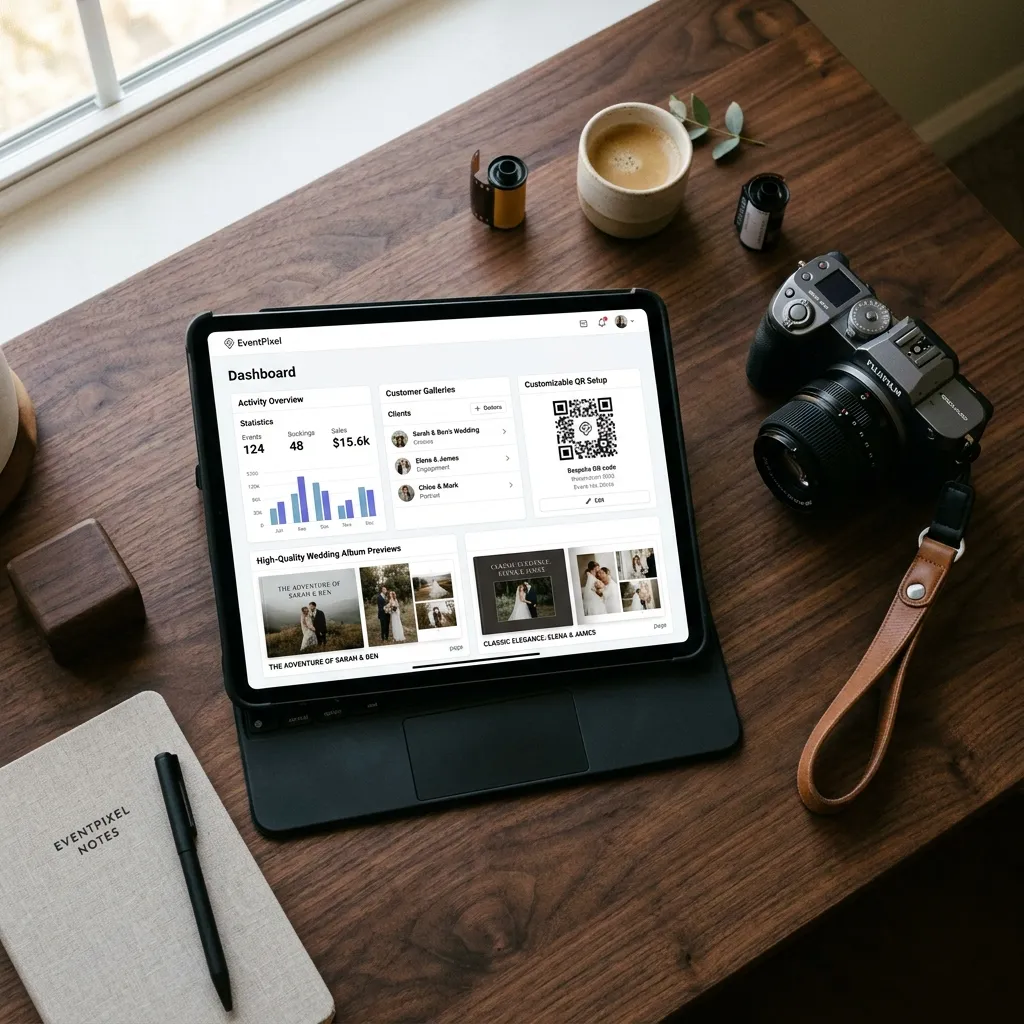
Guests scan a QR code on the welcome sign or table card and the gallery opens in their browser — no app, no account, which is the friction the table above shows almost nobody else removes.
Photos land at original quality in one live gallery, appear on the venue's photo wall in seconds, and PixelFind AI face search lets each guest take one selfie and instantly collect every photo they appear in.
Honest scoping: for everyday personal backup, use Google Photos or Amazon Photos — that isn't our job.
EventPixel is priced per event, not per month: the free plan includes an event website, 100 guest uploads and the live photo wall; paid plans are one-time — $19 Classic (unlimited uploads, voice messages, RSVP), $39 Premier (opens PixelFind face search to every guest; on Free and Classic the host can try it on their own event), $69 Grand (24-month gallery, unlimited co-hosts, no EventPixel branding). Current details always on the pricing page, and the wedding photo sharing app page covers the full toolset. Verdict: built for the one situation the other nine can't handle — a crowd that installs nothing.
How to Choose: Three Questions That Decide It
- Who's contributing? Just you → Google/Amazon Photos. An invited circle who'll install an app → FamilyAlbum, Cluster. A crowd at an event who'll install nothing → a QR-based platform, or Dropbox File Requests if you only need collection and don't care about the browsing experience. More on the no-download approach in our guide to sharing event photos without an app.
- Does quality matter later? If you'll ever print: avoid iCloud Shared Albums created before iOS 27 (2048px) unless you upgrade them, PhotoCircle free (3.2 MP), and default WhatsApp sends. Insist on platforms that keep originals — and check the download side too, per our bulk download guide.
- Where does the free tier actually end? Google's 15 GB fills with your email. Dropbox's 2 GB fills with one video. Flickr stops at 1,000 items. Free tiers are trials with better marketing — pick the app whose paid shape you can live with.
FAQ
What is the best free photo sharing app in 2026?
For personal libraries, Google Photos — 15 GB free and the best search. For family circles, FamilyAlbum offers unlimited free photo storage. For an event where guests shouldn't need accounts, EventPixel's free plan covers 100 guest uploads, an event website and a live photo wall. "Free" differs mainly in where the limit sits: storage, members, or uploads.
What is the best photo sharing app for groups?
If the group will install an app: Cluster (10 free groups of 1,000 photos, private by design) or FamilyAlbum for family circles. If the group won't install anything — typical for weddings and parties — use a browser-based platform like EventPixel, where a QR code or link opens the shared album directly and no account is required to contribute.
Which photo sharing apps keep original quality?
Amazon Photos (with Prime), Google Photos in Original quality mode, Dropbox, Flickr on its Pro plan, iCloud Shared Albums created or upgraded on iOS 27, and EventPixel all preserve original resolution. The notable quality reducers: older iCloud Shared Albums (2048px long edge), PhotoCircle's free tier (3.2 MP), and WhatsApp's standard sends, which its own documentation describes as compressed.
Can people add photos to a shared album without creating an account?
On most platforms, no — Google, Apple, Amazon, Flickr, PhotoCircle and Cluster all tie contributions to an account. The two exceptions: Dropbox File Requests (anyone can send files to your Dropbox, no account) and EventPixel, where guests scan a QR code and upload from their browser with no sign-up.
What is the best shared photo album app?
For an invited circle willing to install an app, Cluster and FamilyAlbum are the strongest shared photo album apps — private by design, free at realistic sizes. For a shared album an entire event contributes to, a QR-based browser gallery like EventPixel removes the install-and-account step that stops most people from ever adding their photos.
What is the best photo sharing app for a wedding?
One built for guests rather than owners: browser-based access via QR code, no app download, original-quality uploads, host moderation, and a way for guests to find their own photos afterwards. EventPixel adds PixelFind AI face search — each guest takes one selfie and gets every photo they appear in. For a full wedding-specific ranking, see our best wedding photo sharing apps of 2026.
Does WhatsApp reduce photo quality?
Yes, by default. WhatsApp's own help pages state that shared media is usually compressed and may be lower quality than the original. The HD send option improves this, and sending images as documents carries files up to 2 GB (WhatsApp confirms the size limit, not that compression is skipped) — but neither turns a group chat into a browsable, permanent album.
How we checked
Every limit and price above comes from each platform's own help, pricing or app-store pages, last checked on 10 September 2026, with the iCloud rows updated on 13 October 2026. Where a platform publishes no number, we say so rather than guess. Three changes since our August version:
- iCloud Shared Albums: since iOS 27, albums created or upgraded on iOS 27, iPadOS 27 or macOS 27 share at full resolution, and new items count against the album owner's iCloud storage (Apple support article 108916, published 14 September 2026). Older albums keep the 2048px limit until upgraded.
- PhotoCircle: the $1.29/month PhotoCircle+ add-on does not restore quality; 12 MP is only on the organisational plans.
- Cluster: prices now appear only in the App Store listing, not on the website.
Conclusion
There is no single best photo sharing app — there's the right tool per situation. Back up your life with Google or Amazon. Keep the family circle on FamilyAlbum or Cluster. Publish your craft on Flickr.
And when the situation is an event — one day, hundreds of photos, guests who will not install anything — use a platform built for exactly that. Create a free EventPixel event, print the QR code, and every phone in the room becomes part of your album.
Related reads:







